Cockpit is a bundle of 12 mods for Claude Code. The guards stop an agent's mistake before it costs you: a secret in tool output, a pipe that hides a failed test, a build killed by the memory limit, a commit that sweeps in another session's edits. The instruments show where the session stands, under the prompt, under the spinner, and on a page with every session on the machine.
claude plugin marketplace add joaosavi/cockpit
claude plugin install cockpit@cockpit
1
Install the bundle
In a terminal, add the marketplace and install cockpit. It brings the 12 mods as dependencies.
Restart Claude Code and type /cockpit:setup. It asks four questions with previews, writes the status line, the spinner tip and when to compact, and keeps a backup of the file it changed.
Claude Code 2.1.287 or later, on macOS, Windows or Linux. Mods use Claude Code's function hooks, which are in early access and may change between releases.
Node 22.18 or later, for the status line script.
Python 3.9 or later and curl, for the panel page. macOS and Windows 10 or later ship curl.
A Nerd Font in your terminal, for the status line icons. Without one, choose the plain icons during setup.
The status line, the spinner line and the panes are part of Claude Code's terminal interface. Run claude in a terminal: Terminal or iTerm on macOS, Windows Terminal or PowerShell on Windows, or the terminal panel of VS Code or JetBrains. The mods are not tested in the Desktop app or in the chat panel of the IDE extensions.
Two commands in a terminal, a restart, and a setup with four questions. It takes about five minutes.
Install
Add the marketplace and install the bundle
terminal
claude plugin marketplace add joaosavi/cockpit
claude plugin install cockpit@cockpit
The second command lists the mods it installs, as + 12 dependencies.
Restart Claude Code
The new session loads the mods. A session that was already open picks them up with /reload-plugins.
Run the setup
inside Claude Code
/cockpit:setup
A plugin cannot write the status line, the spinner tip or when to compact by itself, because they live in your settings.json. The setup writes them, keeps a backup of the file it changed, and tells you what you will notice.
What the setup asks
Question
Options
Status line style
refined (recommended), blocks, minimal or compact, each with a preview drawn by the real script, with your own folder and branch.
Icons
The setup prints three Nerd Font icons and asks whether they show. If you see boxes, it uses plain arrows and marks that every terminal draws.
Time zone
Only when the system is on UTC. It sets the clock times the mods show and what counts as today.
When to compact
Earlier, at about 70% of a 1M model (recommended, 733000), Claude Code's default near the end, or at about half (500000). Skipped when the model's window is under 200K.
The setup also turns on auto-update for the marketplace, without asking. Run /cockpit:setup again to change an answer: it reads what is set and asks only about what you want to change.
Check the install
terminal
claude plugin list
You should see 13 entries ending in @cockpit, each marked enabled: the bundle and the 12 mods. An entry marked failed to load points to a version mismatch; see Troubleshooting.
Updates install by themselves
With auto-update on, a few minutes after the first message of a session, Claude Code updates every mod with a new version, installs any mod added to the bundle, and shows Plugin updated: <name> · Run /reload-plugins to apply. To turn it off, open /plugin, go to Marketplaces, and select cockpit.
macOS, Windows and Linux
Every mod runs on all three systems, and they are tested on Linux only. Two things differ:
memory-guard and the memory figure of the hud read cgroup limits and /proc/meminfo on Linux. On macOS they read vm_stat and on Windows PowerShell, and there they compare against the whole machine's memory. The macOS and Windows readings are tested only against simulated output.
The panel page shows memory by cgroup, systemd services and the share of CPU time spent waiting on disk only on Linux.
On Windows, the setup points the status line at Node instead of the .sh script, because PowerShell cannot run a shell script.
On a Team or Enterprise plan
Every mod works the same on every plan, except global-memory. Team and Enterprise plans run a built-in guard that skips plugins you install yourself on the two hooks it needs, so it installs and does nothing until your organization lists it in managed settings. The other mods run as usual. The global-memory page shows the two settings.
Coming from the agent marketplace
Cockpit was called agent before October 2026. Rename every @agent key to @cockpit in ~/.claude/settings.json, then run claude plugin marketplace remove agent before the steps above. Removing a marketplace deletes the saved options of its plugins, so rename the keys first, or run /cockpit:setup again afterwards.
After the setup and a restart, three things show on screen. The guards stay out of sight until they act.
The status line
The hud draws two rows under the prompt: the model, the folder, the git branch and its changes, then the context window, the 5-hour and 7-day plan windows, and the memory headroom.
The bars turn from green to red as they fill. The 2h20m after the 5-hour percent is the time until that window resets. The other three styles are on the hud page.
The line under the spinner
While a turn runs, Claude Code shows a tip under the spinner. spinner-status replaces it with one line from Haiku about what the agent is doing right now.
claude · ~/acme-api
✻ Propagating… (6s · ↓ 90 tokens)⎿Now: Running the tests after the fix to the date filter
Now: is where the session stands. Mods: is a tip about the mods you have.
The session page
panel starts a local web page with every session on the machine. Type /panel for its address.
Open the address in a browser. A session that waits for you comes first, with the options it offered as buttons. The panel page shows its six views.
Commands to try
Command
What it shows
/limit
The plan windows, when each resets, and what the mod holds back near the limit.
/hud
The full heads-up display: session, limits, memory, what runs now, and today's mod actions.
/ram
Memory headroom per group, or of the machine, and the measured peak of each heavy command.
When a guard acts
The agent reads a short note that starts with the mod's name, such as pipefail: or Loop check, and usually tells you about it. The latest note also shows in the band above the prompt while the turn runs.
Hides every secret value in tool output before the agent reads it.
Why
A secret that reaches the transcript is sent to the model and kept in the session log, and from then on it must be rotated. Tool output leaks secrets easily: env, cat .env, a stack trace with a connection string. This mod replaces each value with <hidden:NAME> in every tool result, built-in, MCP and subagent alike.
What it does
The values come from the secrets file and every file in the folder beside it named like it plus .d (~/.secrets.d/ by default), from every .env* file under the .env root (5 levels deep) when you set one, from environment variables with a secret-looking name (TOKEN, SECRET, PASSWORD, KEY, AUTH and others), and from the password of every scheme://user:password@ URL.
Known token formats are hidden even when no list has them: GitHub, Anthropic, OpenAI, AWS, Google, Stripe, Slack, JWT and private key blocks. They show as <hidden:github>, <hidden:jwt> and so on.
A tool that hands out secrets, such as a password vault CLI, can keep its own NAME="value" list in a file in the secrets folder, without touching your secrets file. A file whose name starts with a dot is skipped, so the tool can write a temporary file and rename it into place.
A value that also appears in a .example file is already public and stays visible.
When the agent writes <hidden:NAME> into a .env file or the secrets file, the mod writes the real value in its place. The agent edits those files without ever seeing a value.
When the agent writes <hidden:NAME> in a Bash command, the mod runs the command with the real value, and the output comes back hidden as usual. The transcript keeps the command as written. The agent can call an API with a token it never sees.
A placeholder the mod cannot fill stops the command instead: a token known only by its format, or a name with two different values in your files, such as the same DATABASE_URL in two projects. The agent is told to read the value inside the command, from its variable or .env file.
If the mod itself fails, it withholds the output instead of passing it unchecked.
Options
Option
Default
What it does
enabled
true
Off, the mod does nothing: every value shows in tool output as it is. Takes effect in the next session, or after /reload-plugins.
secretsFile
~/.secrets
KEY=value file whose every value is a secret, whatever its name.
Shorter values are left alone, except known token formats and the values of the secrets files.
fillCommands
true
Run a Bash command that names <hidden:NAME> with the real value. Off, such a command does not run, and the agent is told to read the value inside the command.
By default the mod reads no .env files. To cover your projects' .env files too, set envRoot to the folder that holds your repos, such as ~/code. The mod then scans it at start, checks its folders for new .env files at most once a minute, and rebuilds the list at least every 10 minutes.
What it records
~/.local/state/mods/secret-guard/<day>-<session>.jsonl: one line each time the list is rebuilt (with how long it took), a result is redacted, a placeholder is restored or filled in a command, or a command is stopped, with secret names and counts only, plus one session-summary line. The values live only in the mod's memory, never on disk. Each line has at, session and event.
Cost
The hook added about 64 ms per tool call on the author's Linux machine (60 calls measured in October 2026, an estimate), with envRoot set to a folder of about 140 subfolders, most of it checking whether a source file changed.
Limits
A secret shorter than minLength that matches no known format stays visible. A value from the secrets file or its folder is hidden from 6 characters, because a vault hands out passwords of 8 to 11; under 6, a value is a PIN or a word, and hiding it would garble ordinary output.
A secret that the agent already saw before this mod loaded is still in the transcript.
A .env file outside envRoot is not read, so its values stay visible unless another source has them.
Filling a placeholder in a command lets the agent use a secret, including sending it to a server. It cannot do more than it already could with source .env, but the command runs without a prompt of its own.
Placeholders are filled back in Bash commands only. On Windows without Git Bash, a PowerShell command with a placeholder runs as written. Output of every tool is still hidden.
Tested on Linux only. The macOS and Windows paths are covered by unit tests with a simulated environment.
Install this mod alone
The cockpit bundle already installs secret-guard with the other mods. To install it alone:
terminal
claude plugin marketplace add joaosavi/cockpit
claude plugin install secret-guard@cockpit
Warns when two Claude Code sessions on the same machine work on the same files, and holds a git command once when it would take another session's uncommitted edits along.
Why
Running several sessions at once is common, and two of them often land in the same repo. On the author's Linux machine, 11 pairs of sessions edited the same repo less than 30 minutes apart in 8 days, and 5 of those pairs edited the same file. Claude Code's Edit already refuses a file changed since it was read, so one session does not silently overwrite the other. What it does not catch is git: git add -A or git commit -a in one session stages the other session's half-done edits, and git stash, checkout or reset --hard moves or discards them.
What it does
Each session keeps one record in ~/.local/state/mods/collision-guard/sessions/<session>.json with the files it edited. Only that session writes it.
After an edit, when another live session also edited that file and git still shows its change, the agent reads a note naming the session and how long ago, and you see a toast. Outside any git repo, the other edit counts for windowMinutes. Each edit of the other session warns once.
Before a git command that would stage, commit, stash, switch away from or discard another session's uncommitted edits, the mod holds it and lists those files. The agent can name its own files instead, or run the same command again within 2 minutes to let it through.
It reads cd earlier in the line and git -C <dir> to find the repo. Quoted text, such as a commit message, is not read as a command.
A command that names paths, such as git add -A mods/ or git checkout -- src/a.ts, is held only for the other session's edits under those paths. A wildcard or :/ counts as the whole repo.
Ended sessions mark their record, and records older than expireHours are removed when a session starts.
Options
Option
Default
What it does
enabled
true
Off, the mod does nothing: no record, no warning, no git hold. Takes effect in the next session, or after /reload-plugins.
git
confirm
confirm holds a risky git command once. note lets it run and tells the agent afterwards. off leaves git commands alone.
windowMinutes
30
How long another session's edit to a file outside any git repo still counts. Inside a repo, an edit counts while git shows the file as changed.
expireHours
24
A session silent this long counts as gone, and its record is removed.
editWarnings
true
Tell the agent, and show a toast, when another session edited the same file. Off, edits are still recorded, so the other sessions and the git guard still see them.
What it records
~/.local/state/mods/collision-guard/<day>-<session>.jsonl: one line per warning (edit-warned, git-held, git-confirmed, git-noted) with the git operation and how many files, never a file's content, plus one session-summary line. Each line has at, session and event.
Cost
A tool call that is neither an edit nor a git command costs nothing measurable. An edit reads the other sessions' records and runs git rev-parse once per folder; when another session edited the same file, it also runs git status on it. In the first live test, the edit that found a collision took 444 ms of hook time, and the others under 60 ms (7 calls, October 2026).
Limits
Sessions must share the machine and the home folder. Sessions on another computer, or in a container with its own home, are not seen.
A file changed by a Bash command (sed -i, a script, a formatter) is not recorded as an edit. Only Edit, Write, MultiEdit and NotebookEdit are.
git checkout <name> reads the same whether <name> is a branch or a file, so the note says "to another branch or an older version".
Tested on Linux only. On Windows, paths are compared with forward slashes, as git prints them, and git commands through the PowerShell tool are checked like Bash ones. A cd to a Git Bash path such as /c/work is not followed.
Install this mod alone
The cockpit bundle already installs collision-guard with the other mods. To install it alone:
terminal
claude plugin marketplace add joaosavi/cockpit
claude plugin install collision-guard@cockpit
Adds set -o pipefail; to a command that pipes a test, typecheck or lint run into tail, head or grep.
Why
A pipeline exits with the code of its last command. yarn test | tail -20 exits 0 when tests fail, because tail succeeded, and the agent reads a pass. Rewriting the command costs nothing and saves the agent a wrong conclusion.
What it does
Matches a runner where it runs: yarn, npm run, pnpm or bun run with test, e2e, typecheck, lint, check and similar scripts, or with a script named in extraRunners, plus turbo run, vitest, jest, playwright test, tsc, vue-tsc, eslint, pytest, go test and cargo test. Quoted text and heredoc bodies do not count.
Puts set -o pipefail; in front, runs the command, and tells the agent that a | head can make a runner exit 141 (SIGPIPE).
Leaves alone a command that already mentions pipefail.
what the mod rewrites
yarn test | tail -20
# becomes
set -o pipefail; yarn test | tail -20
Options
Option
Default
What it does
enabled
true
Off, the mod does nothing: no command is rewritten. Takes effect in the next session, or after /reload-plugins.
extraRunners
empty list
Script names that also count as runners when a package manager calls them: yarn <name>, npm run <name>, pnpm <name>, bun run <name>.
Add a repo's own check script here when its exit code says whether the code works, such as verify for a script that runs lint, types and tests. The mod then rewrites yarn verify | tail too.
What it records
~/.local/state/mods/pipefail/<day>-<session>.jsonl: one line per rewrite naming the runner (yarn vitest, never the whole command), plus one session-summary line. Each line has at, session and event.
Cost
The hook added about 2 ms per Bash call on the author's Linux machine (56 calls measured in October 2026, an estimate).
Limits
Only tail, head and grep as the filter. Other filters, such as sed or awk, are left alone.
A runner hidden inside a script the command calls is not seen.
Only the Bash tool. On Windows without Git Bash, commands run through the PowerShell tool and the mod leaves them alone. Tested on Linux only.
Install this mod alone
The cockpit bundle already installs pipefail with the other mods. To install it alone:
terminal
claude plugin marketplace add joaosavi/cockpit
claude plugin install pipefail@cockpit
Keeps typecheck, build, test and Playwright runs under the memory limit, and reruns a command killed with exit 137 with one process. On Linux the limit is the tightest cgroup limit or the machine's memory; on macOS and Windows it is the machine's memory.
Why
On Linux, when memory runs out, or a cgroup reaches its memory.max, the kernel kills the largest process, which is usually the heavy command, and the agent sees exit 137 without knowing why. This mod checks the headroom before a heavy command runs and adapts the command to it.
What it does
Before a heavy command runs, the mod compares its expected peak with the headroom, minus the margin. The headroom is the machine's available memory, or the room left under the tightest cgroup limit when the session runs in one, as under a systemd service or in a container:
It fits
It runs as written.
Only a single process fits
The mod adds --concurrency=1, --workers=1 or --maxWorkers=1 and tells the agent.
Nothing fits
The mod waits up to waitSeconds for memory to free up.
Memory does not free up
The mod refuses the command and tells the agent what uses the memory.
After the command, the mod stores its measured peak for the next estimate, and reruns with a single process a command that died with exit 137. Until a command is measured, the estimates are 1 GB for typecheck and build, 600 MB for tests and 500 MB for Playwright.
Without a cgroup limit, as on most Linux desktops and laptops, the headroom is MemAvailable from /proc/meminfo. On macOS it is the free, inactive, speculative and purgeable pages of vm_stat, against the total of sysctl -n hw.memsize. On Windows it is FreePhysicalMemory against TotalVisibleMemorySize, read through PowerShell. Under a cgroup limit, it counts the working set: memory.current minus inactive_file, which the kernel frees before it kills anything.
Commands
/ram shows the headroom, each cgroup's use and limits when there are any, and the measured peaks. It says there is no memory reading when the system gives none. In a terminal it also opens the Memory pane: a bar per cgroup with the high mark, refreshed every 2 seconds. Press r to refresh and esc to close.
Options
Option
Default
What it does
enabled
true
Off, the mod does nothing: heavy commands run as written, and /ram is gone. Takes effect in the next session, or after /reload-plugins.
margin
2
Share of memory kept free: of each cgroup's memory.max, or of the machine's total without a cgroup limit. The high mark counts only for a cgroup with no max.
waitSeconds
120
How long a heavy command waits for memory before it is refused.
reduce
true
When only a single process fits, add --concurrency=1, --workers=1 or --maxWorkers=1.
wait
true
When nothing fits, wait up to waitSeconds. Off, the next step comes at once.
refuse
true
When memory does not free up, refuse the command. Off, it runs as written and may be killed.
retry137
true
Rerun with a single process a command killed with exit 137.
What it records
~/.local/state/mods/memory-guard/<day>-<session>.jsonl: one line per reduced, refused or retried command and per measured peak, plus one session-summary line with the time commands waited.
The last 3 measured peaks of each command, in the shared mod store under peaks.
Cost
The hook added about 4 ms per Bash call on the author's Linux machine, not counting the time commands waited for memory (56 calls measured in October 2026, an estimate). Each heavy command also reads the memory files once a second while it runs, to measure its peak. On macOS and Windows a reading runs a command instead, and stays fresh for 10 seconds: sysctl and vm_stat take a few milliseconds, and PowerShell about a second to start (an estimate).
Limits
The peak is measured on the whole cgroup, or the whole machine without one, so another session starting at the same time inflates it. Keeping only the last 3 measurements lets an inflated one age out.
tsc has no flag for a single process, so a typecheck that does not fit waits or is refused.
A background command returns at once and gives no measurement.
The macOS and Windows readings are tested only against simulated vm_stat, sysctl and PowerShell output. There the headroom is the whole machine's, with no per-session limit, and a reading can be up to 10 seconds old.
When the reading fails, heavy commands run as they came, nothing waits or is refused, and no peak is stored. /ram says there is no reading. The rerun with one process after an exit 137 still applies.
Install this mod alone
The cockpit bundle already installs memory-guard with the other mods. To install it alone:
terminal
claude plugin marketplace add joaosavi/cockpit
claude plugin install memory-guard@cockpit
Notices when the agent goes in circles and tells it to stop and change approach.
Why
An agent that keeps editing the same file after the same failure burns tokens and time without getting closer. A short nudge at the right moment makes it step back, which a rule in CLAUDE.md does not do reliably.
What it does
The mod counts three signals per agent loop (the main conversation and each subagent), reset at the end of each turn:
Fix attempts: edits to one file while a command that failed has not passed again.
Repeated errors: the same error coming back, with numbers, paths and quoted values ignored.
Repeated calls: the same tool with the same arguments, in a row.
When a count reaches its limit, the mod adds a note to the tool result. The note starts with Loop check and asks the agent to write what it tried, then re-read the code, form a new hypothesis, or ask you. Nothing is refused.
Options
Option
Default
What it does
enabled
true
Off, the mod does nothing: no count, no nudge. Takes effect in the next session, or after /reload-plugins.
editLimit
5
Fix attempts on one file in one turn before the nudge.
errorLimit
3
Times the same error may come back in one turn before the nudge.
repeatLimit
3
Identical tool calls in a row before the nudge.
editCheck
true
Nudge after editLimit fix attempts on one file.
errorCheck
true
Nudge after the same error comes back errorLimit times.
repeatCheck
true
Nudge after repeatLimit identical calls in a row.
What it records
~/.local/state/mods/loop-breaker/<day>-<session>.jsonl: one line per nudge with its kind and count, plus one session-summary line. Each line has at, session and event.
Cost
The hook added about 2 ms per tool call on the author's Linux machine (60 calls measured in October 2026, an estimate).
Limits
A failure is read from the exit code and from failure words in the output, so a tool that fails silently is not counted.
Counts reset at the end of each turn, so a loop that spans several turns is not caught.
Tested on Linux only.
Install this mod alone
The cockpit bundle already installs loop-breaker with the other mods. To install it alone:
terminal
claude plugin marketplace add joaosavi/cockpit
claude plugin install loop-breaker@cockpit
Keeps the account usage limit from running out in the middle of a task.
Why
When a 5-hour or 7-day window reaches 100%, the session stops wherever it is, often mid-edit, and nothing resumes it. This mod slows down before that point, has the agent commit its work, stops at a reserve you keep for yourself, and resumes the session on its own when the window resets.
The three stages
Each window has three stages, each with its own switch and percentage:
Stage
5-hour window
7-day window
Throttle: one subagent at a time
90%
97%
Commit: ask for a wip: commit
97%
98%
Pause: keep the rest for you
98%
99%
The 7-day limits also apply to the per-model weekly windows, such as seven_day_opus. Each window is judged by its own limits, and the most restrictive result applies: a paused window beats a throttled one. When two windows are paused, the one that resets last holds the session.
What it does
From the throttle, only one subagent runs at a time.
From the commit stage, the agent is asked once per window to commit its work in progress in each repository it changed, with a wip: message and without pushing. It stages only the files it changed, so the work of another session in the same repository stays out. Only the main conversation gets the request.
At the pause, every tool call is refused except a command that only stages and commits (git add, git commit, cd, chained with &&), so the work still gets committed when a burst of requests jumps straight past the commit stage. The agent writes in up to 3 lines where it stopped, and the mod schedules the resume for the reset time plus 2 minutes.
A prompt you type during the pause gets one turn without subagents, spent from the reserve.
A prompt nobody typed (a routine, another session, a task notification) is held and delivered with the resume.
The band above the prompt shows each window with a bar, its own pause mark, the percent and the reset time, from 75% by default. Each bar turns yellow from its window's throttle or commit stage and red from its pause.
The status line under the prompt shows the state while the mod holds something back.
Commands
/limit shows each window with its stages, the state, and what is held for the resume. Plain text, so it reads the same in Remote Control.
Options
Option
Default
What it does
enabled
true
Off, the mod does nothing: no throttle, commit, pause or resume, and /limit is gone. Takes effect in the next session, or after /reload-plugins.
fiveHourThrottle
true
Throttle in the 5-hour window.
fiveHourThrottleAt
90
From this share of the 5-hour window, one subagent at a time.
fiveHourCommit
true
Commit request in the 5-hour window.
fiveHourCommitAt
97
From this share of the 5-hour window, ask the agent once per window to commit without pushing.
fiveHourPause
true
Pause in the 5-hour window.
fiveHourPauseAt
98
The session pauses at this share of the 5-hour window.
sevenDayThrottle
true
Throttle in the 7-day windows.
sevenDayThrottleAt
97
From this share of a 7-day window, one subagent at a time.
sevenDayCommit
true
Commit request in the 7-day windows.
sevenDayCommitAt
98
From this share of a 7-day window, ask the agent once per window to commit without pushing.
sevenDayPause
true
Pause in the 7-day windows.
sevenDayPauseAt
99
The session pauses at this share of a 7-day window.
timeZone
empty
IANA time zone of the reset times shown, such as America/New_York. Empty uses the system time zone.
resume
true
Resume the session when the window resets, after the pause or after the limit error. Off, you resume it, and automatic prompts that arrive during the pause are dropped instead of held. The older name resumeOnError still works.
bandFrom
75
Show the band from this share of the fullest window.
The window options have no default in the manifest, so the settings from before 1.2 still apply where they are unset. alert sets the throttle of every window, commitAt the commit (0 turns it off), and reserve the pause at 100 minus its value. A window option always wins over them for its own stage.
What it records
~/.local/state/mods/usage-limit/<day>-<session>.jsonl: one line per state change, refusal, held prompt and resume, plus one session-summary line when the session ends.
The last reading of the windows, in the shared mod store under windows, so a new session starts from the reading another session took.
Cost
The tool.call hook added about 6 ms per tool call on the author's Linux machine (60 calls measured in October 2026, an estimate).
Limits
The reading arrives with each model response, so a burst of parallel requests can pass the pause before the next reading. The resume after the limit error and the commit allowed during the pause cover that case.
A prompt with an origin Claude Code cannot classify counts as yours and spends the reserve.
/clear, /resume and /branch cancel the scheduled resume and drop the held messages of the previous conversation.
In the pause, the commit-only command passes through the Bash tool or, on Windows without Git Bash, the PowerShell tool.
Tested on Linux only.
Install this mod alone
The cockpit bundle already installs usage-limit with the other mods. To install it alone:
terminal
claude plugin marketplace add joaosavi/cockpit
claude plugin install usage-limit@cockpit
Shows the model, the project and its git branch, the context window, the plan limits and the memory headroom, under the prompt as a status line or above it in the band. While a turn runs, the band adds the latest note another mod added to a tool result, which only the model reads otherwise.
The four styles
Pick one with the style option. Each style drops its least useful fields first when the terminal is narrow, so no row passes the width. Below is the real output of statusline.sh for the same session.
A mod cannot draw rows under the prompt: that place belongs to the status line command of the settings. The mod ships one, statusline/statusline.sh, and /cockpit:setup writes it for you. To set it by hand on macOS or Linux, put this in ~/.claude/settings.json, with band set to off so the rows do not show twice:
The script needs Node 22.18 or later. refreshInterval re-runs the script every 5 seconds, so git, the PR and the session time stay current while the session is idle. On Windows, PowerShell cannot run a .sh file: point the command at node ~/.claude/plugins/marketplaces/cockpit/hud/statusline/statusline.ts, with forward slashes.
Git and the PR
The git field shows the branch, then commits to push, commits to pull, files staged, files changed outside the stage and untracked files, or synced when there is nothing. The PR is the branch's open pull request from gh pr view, with its checks: passing, failing or running. gh takes about a second, so the script runs it in the background at most once a minute and shows the last answer meanwhile. Without gh, or without an open PR, the field is left out.
Icons
With icons set to nerd, the default, the git, folder, model and memory fields use Nerd Font glyphs, which show only when the terminal's font is a Nerd Font. With unicode, they use ↑ ↓ + ● ? ✓ and no glyph for the folder, the model and the memory.
The band above the prompt
Without the status line, the hud draws in the band above the prompt. With band at panel, the default, it draws two rows, with the right side of the first row flush with the last column:
band · panel
Opus 5.5 · my-app main●38m · 214 calls
ctx ▰▰▰▰▱▱▱▱▱▱42% 5h ▰▰▰▰▰▰▱▱▱▱61%resets 2h30m 7d ▰▰▰▰▱▱▱▱▱▱44% mem 1.9G free
While a turn runs and another mod left a note, the activity row follows, such as loop-breaker: repeated error. It hides when the turn ends. Claude Code already draws the running tool, its errors, the subagents and the turn's time, so the band leaves them out.
Field
Colors
ctx, the context window
green below 60%, yellow below 85%, red from 85%
5h and 7d, the plan windows
green below 75%, yellow below 90%, red from 90%
mem, the memory that still fits
yellow below 1 GB, red below 500 MB
Activity row
yellow
In a narrow terminal the band drops fields instead of wrapping: first it shortens the bars, then drops mem, then shows ctx, 5h and 7d as percents only, then drops the reset countdown. With band at line, it draws one row:
band · line
Opus 5.5│ my-app main●│ ctx 42%│ 5h 61%│ 7d 44%│ mem 1.9G
MEMORY names the session's own cgroup and the group whose limit sets the headroom, or the machine's memory without a cgroup limit. TODAY counts today's lines in the other mods' diaries. The pane refreshes every 2 seconds while it is open; press r to refresh now and esc to close it.
Options
In /config, or under pluginConfigs in ~/.claude/settings.json.
Option
Default
What it does
enabled
true
Off, the mod does nothing: no band, no activity row, no /hud, and the status line script prints an empty line. Takes effect in the next session, or after /reload-plugins.
band
panel
panel draws two rows above the prompt, line one, off none (/hud still works). Use off with the status line.
activity
true
Shows the activity row while a turn runs.
memory
true
Shows the memory headroom in the band and the MEMORY row.
bar
dots
The bar glyphs: blocks (▰▱), solid (█░), line (━─), dots (●○) or squares (■□).
barWidth
10
Cells of a full-width bar, 4 to 30. A narrow terminal still shrinks the bars.
colors
empty
The colors for ok, warning and critical, separated by spaces: a name, #rrggbb or a 256-color number. Empty uses green, yellow and red.
hide
empty
Fields to leave out, separated by commas: model, project, branch, age, calls, ctx, 5h, 7d, reset, mem.
barColor
gradient
gradient colors each cell by its place, green to red. solid colors the whole bar by its percent. tone keeps the three colors of colors.
style
refined
The status line layout: refined, blocks, minimal or compact.
icons
nerd
nerd for Nerd Font glyphs, unicode for plain marks.
contextBase
compact
What ctx measures against. compact: 100% is the auto-compact window, when smaller than the model's. window: the model's full window. The status line only.
timeZone
empty
The IANA time zone for the times shown and for what counts as today. Empty uses the system time zone.
Cost
The band's render hook does no I/O: it lays out values that events and timers already read. Every 15 seconds, idle or not, it runs one git status (3-second timeout) and a memory reading. During a turn, a 1-second timer reads the agent list for /hud, and redraws only while the pane is open. Each tool call adds two redraw requests, and Claude Code throttles redraws to 10 a second.
Limits
On macOS and Windows there is no per-session limit, so the memory field shows the whole machine. Those readings are tested only against simulated output.
When the reading fails, the memory field is left out.
The PR field needs the GitHub CLI, gh, signed in.
The band, the status line and the pane are part of the terminal interface. Tested only in a terminal, and the Windows setup is not tested.
Install this mod alone
The cockpit bundle already installs hud with the other mods. To install it alone:
terminal
claude plugin marketplace add joaosavi/cockpit
claude plugin install hud@cockpit
Replaces the tip under the spinner with one short line of its own: where the session stands, written by Haiku, or a tip about the mods you have installed that fits the moment.
claude · ~/acme-api
✻ Propagating… (6s · ↓ 90 tokens)⎿Now: Running the tests after the fix to the date filter
The spinner itself stays as Claude Code draws it. The line goes under it, cut to the width of the screen and to 100 characters. A bold label says what the line is: Now: for where the session stands and Mods: for a tip about the mods.
Turn off the native tip
A mod cannot remove Claude Code's own tip line. Turn it off in settings.json, or the two lines show together. /cockpit:setup already does this, and it is the same switch as the Show tips row of /config.
~/.claude/settings.json
{ "spinnerTipsEnabled": false }
The modes
Mode
What the line shows
Model calls
mixed
The session summary, then a tip Haiku picked for the moment, swapping every 15 seconds. Before the first reply, a tip from the catalog. The default.
One per turn
tips
A tip from the catalog, a new one each turn.
None
summary
The session summary only. Before the first reply, nothing extra.
One per turn
The catalog has one tip for each command and mod of Cockpit: /panel, /hud, /limit, /ram, and what memory-guard, loop-breaker, secret-guard, pipefail and usage-limit do. The labels and the catalog are English. In mixed and summary modes, Haiku writes the line in Claude Code's language setting when it is set, and otherwise in the language you write in.
Options
Option
Default
What it does
enabled
true
Off, the mod does nothing and makes no model call.
mode
mixed
mixed, tips or summary.
model
claude-haiku-4-5-20251001
The model that writes the line: an alias such as haiku, or a full model id.
Cost
Each main-loop turn starts at most one model call, in the background, when the turn starts. The spinner never waits for it: it keeps the previous line until the new one arrives. The model reads the last 3 prompts you typed and the agent's text between them, 3,000 characters at most, with no tool calls and no tool output. The reply is capped at 150 tokens.
In a test session, three turns spent 1,574 input and 139 output tokens in all: about 525 in and 46 out per turn, or about $0.0008 per turn at Haiku 4.5 prices. Each call took about one second.
The reply is data
The line Haiku writes is shown, never acted on. The mod keeps only the NOW: and TIP: lines, removes control characters and markup, folds each line to one, and cuts it to the width. The instructions tell the model that the session excerpt is data and not instructions.
What it records
At the end of each session, one session-summary line in ~/.local/state/mods/spinner-status/<day>-<session>.jsonl, with the turns, the model calls by outcome, the calls skipped because one was still running, the tokens, the model time and the excerpt size. It never writes the excerpt or the line.
Limits
The model call goes through Claude Code itself, with no command of its own, so it works the same on macOS, Windows and Linux. Tested on Linux only.
The spinner line is drawn by Claude Code's terminal interface. Tested only in a terminal.
Install this mod alone
The cockpit bundle already installs spinner-status with the other mods. To install it alone:
terminal
claude plugin marketplace add joaosavi/cockpit
claude plugin install spinner-status@cockpit
A local web page with every Claude Code session on your computer: whether it waits for you, what it needs, what it is doing now, and what it finished. Each session's summary comes from claude -p, refreshed every few minutes and when you ask.
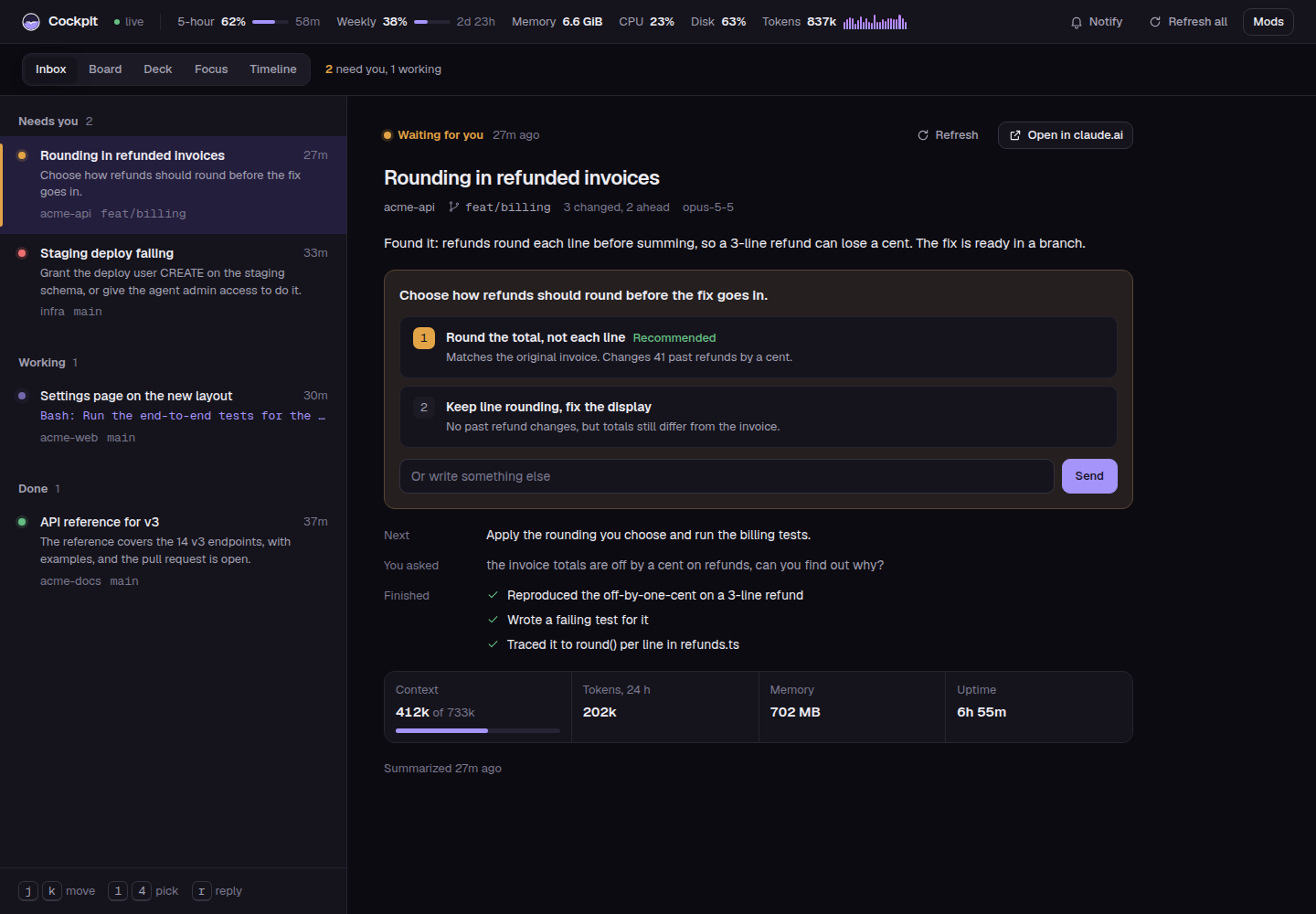
The page with made-up sessions, in the Inbox view.
Open the page
Type /panel in any session for the address, http://localhost:7777 by default, and open it in your browser. The server starts with the first session after you install the mod, and keeps running after that session ends. The page listens only on 127.0.0.1, so only your own computer reaches it. When the sessions run on another machine, see Run on a remote machine.
What the page shows
The header shows the computer in one line: the plan's 5-hour and weekly usage with the time left to each reset, memory, the CPU over the last minute, disk, and the tokens the sessions used in the last 24 hours, hour by hour. A figure turns amber at 75% and red at 90%. On the right are Notify, Refresh all and Mods.
Each session shows its state (Working, Waiting for you, Blocked, Done, Idle), a title, the project, the git branch with its changed files and commits ahead or behind, the model, your last message, the tool running now, the summary of where the task stands, the next step and what it finished. Four figures close it: the context used against the point where it compacts, the tokens of the last 24 hours, the memory of the session's processes, and how long it has run.
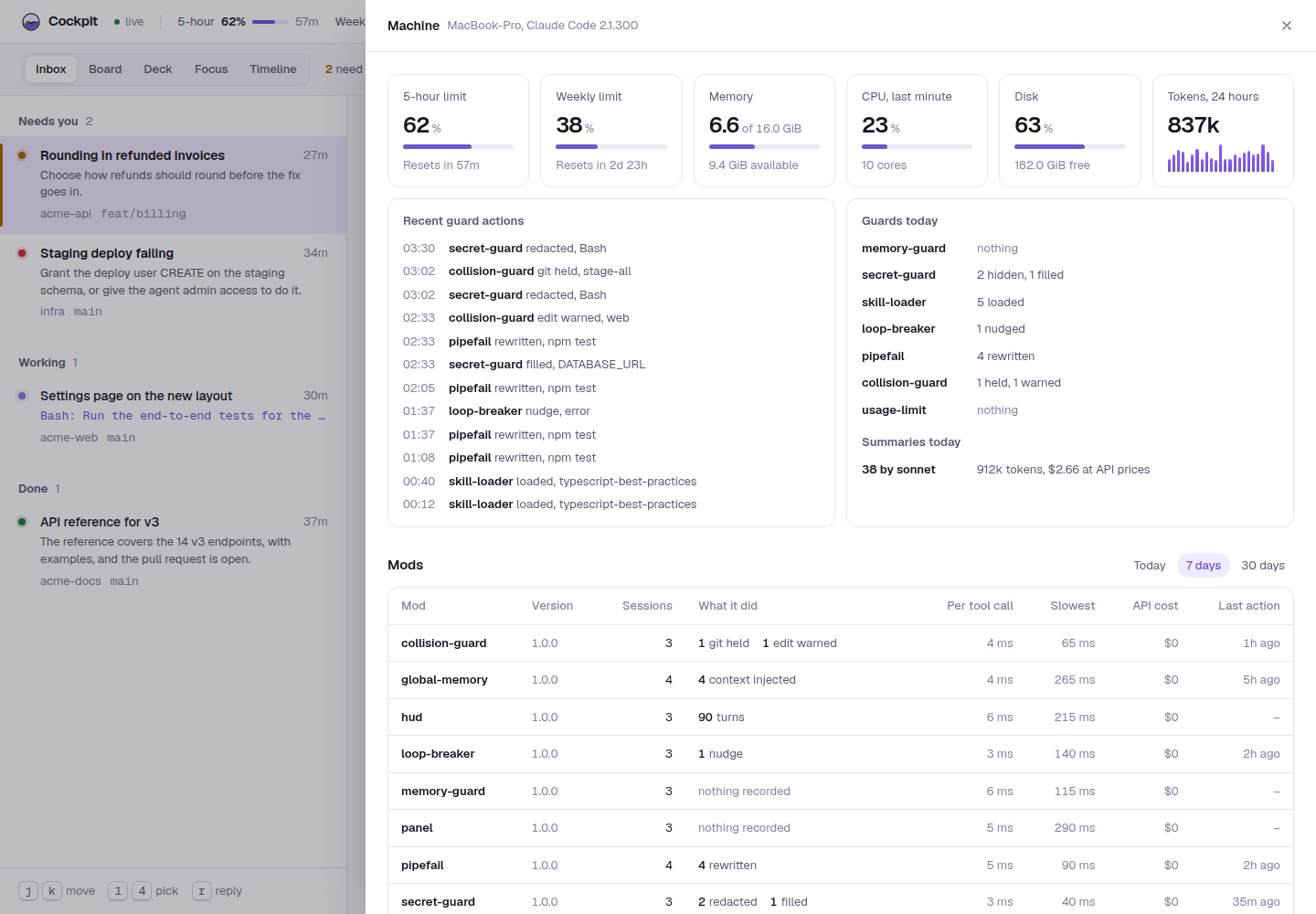
The Mods drawer shows the computer in full, the latest actions of the guards, what each guard did today, and how many summaries the page made today with their tokens and their price at API list prices. On Linux it also shows the memory of each cgroup with a limit and the state of their systemd services.
The six views
The switcher under the header picks the view, and the page remembers it. The address also takes a view as its hash, such as #board, and #mods opens the drawer.
View
What it shows
Keys
Inbox
The default. The sessions by urgency on the left, and the selected one in full on the right.
j and k or the arrows move, 1 to 4 pick an option, r goes to the reply field
Board
Columns by state, with small cards. A card opens the session in a side drawer.
1 to 4 in the drawer, esc closes it
Deck
A grid of full cards, with filters for all sessions, the ones that need you, working, done and ended.
Focus
One large card for the session that needs you most, and the others below it.
n and p or the arrows move
Timeline
A row per session with its tokens hour by hour over the last 24 hours, and a row for all sessions together.
Tasks
The open tasks of the native task list in groups (In progress, Waiting, Queued), each from P0 up, with filters by priority and group, and the last 30 tasks the todo mod archived. A row opens to show the description. It calls no model.
Working comes from Claude Code itself, as soon as a turn starts. Waiting for you, Blocked, Done and Idle come from the summary, which claude -p writes from the transcript: 20 seconds after a turn ends, every 5 minutes for a session that changed, and when you press Refresh.
Answer a session from the page
When a session waits for a decision, its options are buttons. Press one, or its number key, check the text, and confirm. The reply field sends any text the same way. The page leaves the text in the session's inbox, the panel mod in that session checks the inbox every 2 seconds and submits the text as your prompt, and Claude Code runs it once the session is idle. It works on macOS, Windows and Linux, in a terminal, the Desktop app, an IDE or Remote Control, with or without tmux.
Greyed-out options
A session takes answers only when its mod checked the inbox in the last 15 seconds. Until then its options are greyed out and its reply field is hidden. A session that loaded an older panel mod stays that way until you run /reload-plugins in it. When a session does not take a message within 6 seconds, the page withdraws it and says so.
Audit the mods
The lower half of the Mods drawer audits the mods from their diaries over the last day, 7 days or 30 days. Each row shows the mod's version, whether it is on, how many sessions it ran in, what it did, its failures in red, the time its hooks added per tool call, its slowest hook call, the API cost of its model calls, and its last action. A mod with nothing recorded for a week does no work on your machine.
Options
Option
Default
What it does
enabled
true
Off, the mod does nothing: no /panel, no server start, no answers; a server already running keeps running. Takes effect in the next session, or after /reload-plugins.
port
7777
The port the page listens on, on 127.0.0.1.
model
sonnet
The model claude -p uses for each summary: sonnet, haiku or opus.
refreshMinutes
5
A session whose transcript changed gets a new summary this often.
autostart
true
Start the server when a session starts and the port does not answer. Turn it off when a service manager runs the server.
answers
true
Let the page send text to this session as your prompt. Off, the page shows the session's options greyed out and no reply field.
Start the server by hand
The page needs Python 3.9 or later, as python3, python or py, and curl. With autostart on, the first session starts the server, and it keeps running after that session ends. To start it yourself, run the server file from the plugin folder, which is the installPath of panel@cockpit in ~/.claude/plugins/installed_plugins.json:
terminal
python3 -I <plugin folder>/server/panel.py
On Windows, use python or py in place of python3. Set PANEL_CLAUDE to the path of claude when it is not on the PATH.
How the summary is made
The server builds a digest of the transcript, at most 48,000 characters long: the message that opened the task, then the newest rows that fit, each tool call cut to one line. It sends the digest to claude -p --safe-mode --tools "" --no-session-persistence with a JSON schema. The call loads no hooks, plugins or tools, keeps no transcript of its own, and answers in a fixed shape, in the language you write in.
Cost
Each summary is one claude -p call, and it counts toward your plan's usage limits. On the author's Linux machine in October 2026, a summary of a long session read about 48,000 tokens and took 6 to 10 seconds, and the server's memory peaked at 213 MB during the call. At API list prices with sonnet, a summary cost about $0.07, and with four sessions working the page spent up to $2.40 an hour. On a Pro or Max plan the calls spend plan usage, not money. haiku costs about 20 times less per token, with shorter and less exact summaries.
What it records
~/.local/state/mods/panel/summaries/<session>.json: the last summary of each session, with the time it was made and the transcript size it read.
~/.local/state/mods/panel/<day>-server.jsonl: one line per summary with the reason, the time, the state and the tokens, one line per failure, and one line per sent answer with its length. It never writes the session's content or what you sent.
Limits
The sessions must run on the same machine, under the same user as the server.
The page has no login. Anyone who can connect to the port on that machine can read it, start summaries and type into the sessions, so keep it on 127.0.0.1. The server refuses a request that comes from a page on another site.
An answer sent from the page waits until the session is idle. While a turn runs, it does not reach the agent, and it runs as a new turn after the current one ends.
The state comes from the model and can lag behind the session. A busy session always shows Working.
On macOS and Windows there are no memory groups, no services and no disk wait. Tested on Linux; the macOS and Windows code paths run only through simulated tests.
Install this mod alone
The cockpit bundle already installs panel with the other mods. To install it alone:
terminal
claude plugin marketplace add joaosavi/cockpit
claude plugin install panel@cockpit
Loads the right skill at the right moment, so CLAUDE.md needs no "load skill X before Y" rules.
Why
A rule in CLAUDE.md that says "load this skill before editing that file" works only when the agent remembers it. This mod watches the tool calls and delivers the skill itself.
What it does
When the agent
Skill
Reads or writes a .ts, .tsx, .mts or .cts file
typescript-best-practices
Reads or writes SKILL.md, AGENTS.md or CLAUDE.md
writing-for-agents
Reads or writes CONTEXT.md, CONTEXT-MAP.md or a file under adr/, adrs/ or decisions/
domain-modeling
Reads or writes a README, or runs git commit, gh pr create or gh pr edit
technical-writing
On a read, the skill's full text comes with the file. Edit requires a read first, so the skill arrives before the edit.
On a write without a read (a new file, a commit, a PR), the mod holds the call once, with the skill's text in the refusal, and the agent makes the call again.
When your prompt carries an error or says something broke, the mod reminds the agent to load diagnosing-bugs.
Each skill loads once per conversation. Compaction resets the list, because the summary can drop a skill's text.
The skills
The mod ships the five skills it delivers, in its skills/ folder, so it works with nothing else installed. Claude Code also lists them as skill-loader:<name>. The mod reads a skill from its own folder first, then from <project>/.claude/skills/<name>/SKILL.md, then from ~/.claude/skills/<name>/SKILL.md. The skills are by Matt Pocock, under the MIT license.
Options
Option
Default
What it does
enabled
true
Off, the mod does nothing: no skill is delivered and nothing is held. Takes effect in the next session, or after /reload-plugins.
holdWrites
true
Hold a write, a commit or a PR once, with the skill in the refusal, so the agent redoes it following the skill. Off, the call runs and the skill comes with its result.
diagnoseReminder
true
Remind the agent to load diagnosing-bugs when your prompt carries an error or says something broke.
What it records
~/.local/state/mods/skill-loader/<day>-<session>.jsonl: one line per skill loaded, held call, missing skill and reminder, plus one session-summary line. Each line has at, session and event.
Cost
The hook added about 2 ms per tool call on the author's Linux machine (60 calls measured in October 2026, an estimate). A held write costs the agent one extra call.
Limits
Subagents are left alone: a skill delivered there would land in the main conversation.
The error detection matches common English and Portuguese phrases and stack-trace shapes, so it misses an error described in other words.
Tested on Linux only.
Install this mod alone
The cockpit bundle already installs skill-loader with the other mods. To install it alone:
terminal
claude plugin marketplace add joaosavi/cockpit
claude plugin install skill-loader@cockpit
Adds a machine-wide memory folder beside the per-project auto memory, so facts about the machine reach every session from any folder.
Why
Claude Code's auto memory is per project. A fact about the machine, such as where a tool lives or how a service is reached, saved in one project's memory is missing from every other project. This mod adds one global folder that every session reads, and tells the agent which memories go there.
What it does
Rewrites the memory section of the system prompt to describe both folders and where each type of memory goes: user and feedback default to global, reference goes global when it is about the machine, and project always stays in the project.
Adds the global MEMORY.md to the instruction files, so its index reaches every session the way the project index does.
Keeps core's mode. When memory is read-only, the global folder is described as read-only too. When auto memory is off, or the global folder or its MEMORY.md is missing, the mod changes nothing.
Turn it on
The mod creates nothing. Make the folder and an empty MEMORY.md in it, and the mod starts on the next session:
globalDir can point to a folder inside a git repo, such as ~/dotfiles/memory, so the memories are versioned and can follow you to another machine.
No credentials
Every session on the machine reads the global folder. Never save a password or a key there.
On a Team or Enterprise plan
The built-in guard sec-default@builtin skips mods you install yourself on prompt.section and prompt.context, the two events this mod needs. List it in prependPlugins in managed settings, ahead of the guard, so it counts as your organization's:
On a personal plan it works as installed; on a Team or Enterprise plan it does nothing until these settings are in place.
Options
Option
Default
What it does
enabled
true
Off, the mod does nothing: the memory section stays as Claude Code wrote it. Takes effect in the next session, or after /reload-plugins.
globalDir
~/.claude/global-memory
Folder of the machine-wide memory, with its own MEMORY.md.
What it records
~/.local/state/mods/global-memory/<day>-<session>.jsonl: one line each time the memory section is rewritten, the global index is added, or the mod steps aside and why, plus one session-summary line. Each line has at, session and event.
Cost
None per tool call: the mod has no tool.call hook. It reads the global MEMORY.md when the system prompt and the first context are built. The rewritten text depends only on its input, so the prompt cache stays warm.
Limits
The rewrite matches the wording of the memory section Claude Code 2.1.292 sends. A different wording is left alone and logged as skipped-unrecognized.
Tested on Linux only.
Install this mod alone
The cockpit bundle already installs global-memory with the other mods. To install it alone:
terminal
claude plugin marketplace add joaosavi/cockpit
claude plugin install global-memory@cockpit
Keeps Claude Code's native task list in front of the agent: the open tasks at session start and on each prompt from you, a reminder that a new request becomes a task first, and completed tasks moved to an archive log.
Why
The task tools (TaskCreate, TaskList, TaskUpdate, TaskGet) write one JSON file per task in ~/.claude/tasks/<list>/, so the list outlives a compaction, --resume and --continue. The model forgets that the list is there. After a compaction it works from the summary, and a request that lived only in the conversation is lost. A session that takes many requests, such as a manager that hands work to other agents, needs the list read back to it from disk.
What it does
At session start, adds a note with the open tasks of the session's list.
On each prompt from you, attaches the open tasks and the tasks completed since the last prompt. Messages from other sessions, notifications and schedules get nothing.
With a named list (CLAUDE_CODE_TASK_LIST_ID), the same prompt also carries the rule: a new request becomes a TaskCreate before any other work, with its owner in the subject, such as [owner] what was asked.
Moves a completed task to ~/.local/state/mods/todo/<list>.jsonl and deletes its file, so the list holds only open work. This covers a task completed by TaskUpdate and a task file a script rewrote.
Order of the list
The open tasks go in one group per state, with a count, such as waiting (2):.
A task's priority and state come from metadata.priority and metadata.state in its file. Without metadata, they come from a subject such as [owner] P1 waiting: what was asked: the P number after the owner, then the word before the colon.
A task with no state goes in the group of its native status, in_progress or pending.
In each group, tasks go from P0 up, then the ones with no priority, then by id.
The group that holds the most urgent task comes first. On a tie, the group with a task in progress comes first.
Turn on the task tools
Claude Code offers the task tools by default only on Opus 4.7, Sonnet 4.6, Haiku 4.5 and earlier models. On a newer model, start Claude Code with the variable set. To share one list between sessions, name the list too:
terminal
CLAUDE_CODE_ENABLE_TODO_TOOLS=1 CLAUDE_CODE_TASK_LIST_ID=requests claude
Options
Option
Default
What it does
enabled
true
Off, the mod does nothing. Takes effect in the next session, or after /reload-plugins.
remind
true
With a named list, each prompt from you carries the request rule.
archive
true
Moves completed tasks from the list to the archive log. Off, completed tasks stay in the list.
What it records
~/.local/state/mods/todo/<day>-<session>.jsonl: one line per note, prompt context and archive run, plus one session-summary line. The archive, one line per completed task, is ~/.local/state/mods/todo/<list>.jsonl. Each line has at, session and event.
Cost
The open tasks go in whole with each prompt from you, at about 15 tokens per task, 30 tasks at most. The only tool.call hook is on TaskUpdate.
Limits
On a Team or Enterprise plan, the built-in guard sec-default@builtin skips the session.compact hook of a mod you installed yourself, so the note right after a compaction does not appear. The next prompt from you carries the list. A SessionStart hook with the matcher compact in the session's settings.json can print the open tasks right away.
Task ids restart at 1 after every file has left the list. The archive keeps the subject next to each id.
Tested on Linux only.
Install this mod alone
The cockpit bundle already installs todo with the other mods. To install it alone:
terminal
claude plugin marketplace add joaosavi/cockpit
claude plugin install todo@cockpit
The address of the session page, and how many sessions need you. Starts the server when it does not answer. In a session opened over SSH, also prints the tunnel command.
Memory headroom per group, or of the machine, and the measured peak of each heavy command.
/cockpit:setup
cockpit
Runs the setup again, to change the style or any other answer.
Keys inside a pane
Press r to refresh it and esc to close it.
Keys on the panel page
Press r to summarize every session again, or R in Inbox, where r goes to the reply field. esc closes the send dialog, then the Mods drawer, then the Board drawer. Each view adds its own keys, listed on the panel page.
Every mod option is a row in /config. The setup handles the few settings a plugin cannot write itself.
Change an option
Open /config and scroll to the mod. Each mod's page lists its options, their defaults and what they do. The status line picks up a change within five seconds; for the other mods, restart Claude Code or run /reload-plugins.
In the settings file
The same options live under pluginConfigs in ~/.claude/settings.json, keyed by <mod>@cockpit. This is useful to share a setup across machines:
So the spinner-status line replaces Claude Code's tip instead of sitting under it.
autoCompactWindow
733000 on a 1M model, if you choose it
Claude Code summarizes the conversation at about 70% instead of near the end.
pluginConfigs
band: "off" for the hud, style, icons, time zone
Your answers to the setup questions. With the status line on, the band goes off so the rows do not show twice.
enabledPlugins
claude-hud@claude-hud off, when it was on
Its status line is the one the hud replaces.
pluginConfigs
enabled: false for each mod you turn off, if you ask
Only when you ask the setup to turn mods off.
extraKnownMarketplaces.cockpit
autoUpdate: true
The mods update by themselves.
Turn one mod off
Every mod has an Enabled option. Turn it off in /config, or set "enabled": false under the mod's pluginConfigs entry, then start a new session or run /reload-plugins. Off, the mod registers no hook and costs nothing per tool call. /cockpit:setup can also turn mods off for you.
Claude Code refuses to disable a plugin that an enabled plugin requires, and the cockpit bundle requires every mod. Disable the bundle first, then the mod:
terminal
claude plugin disable cockpit@cockpit
claude plugin disable pipefail@cockpit
The other mods stay on. Enabling the bundle again turns the mod back on.
If you run Claude Code on a remote Linux machine over SSH, the mods work the same, and a few parts do more.
Open the page through a tunnel
panel listens only on 127.0.0.1 of the machine where the sessions run. From your computer, open an SSH tunnel, then open http://localhost:7777. In a session opened over SSH, /panel prints this command with the machine's name.
on your computer
ssh -N -L 7777:127.0.0.1:7777 <host>
To open the tunnel with every SSH login, add one line to the host's entry in ~/.ssh/config on your computer:
~/.ssh/config
Host <host>
  LocalForward 7777 127.0.0.1:7777
Run the page as a service
Instead of letting a session start the page, run it under systemd. Set the panel option autostart to false, then run the server as a unit:
PANEL_PORT, PANEL_MODEL and PANEL_REFRESH_MINUTES set the server's options. Set PANEL_GROUPS to a comma-separated list of cgroup paths, such as agents.slice, to show those groups and everything under them on the page.
Memory limits
When sessions run under a cgroup v2 memory limit, as a systemd service or a container sets, memory-guard keeps heavy commands under the tightest limit, the hud shows the room left under it, /ram shows each group, and the page shows each group's memory and the state of its systemd services.
Remote Control and tmux
Every Cockpit command also answers in plain text, so it works when you drive a session over Remote Control from claude.ai or the mobile app, where no pane is drawn. The page links a session to claude.ai when the session runs with Remote Control. For a session that runs in tmux, its tmux button copies the command that attaches to its pane.
Cockpit runs inside Claude Code on your machine. Two mods send an excerpt of the session to a model, through your own account. Everything else stays local.
What leaves
Mod
Sends
When
panel
An excerpt of each session's transcript, through claude -p, to sonnet by default
On Refresh, when a session goes idle after a turn, and every 5 minutes for a session that changed
spinner-status
The last few prompts and the agent's last text, at most 3,000 characters, to Haiku
Once per turn, or never in tips mode
hud
A gh pr view request for the current branch, to GitHub
At most once a minute, when gh is installed
These calls use the same account and the same data terms as the rest of your Claude Code session. No other mod calls a model.
What stays
Every mod writes a diary under ~/.local/state/mods/<mod>/, one line per action and one summary per session. A diary never holds a secret value or a file's content.
collision-guard keeps the list of files each session edited. An ended session marks its record, and records older than expireHours (24 hours by default) are removed when a session starts.
secret-guard holds secret values in memory only, never on disk.
panel keeps the last summary of each session. The page has no login and listens only on 127.0.0.1. Anyone who can reach that port can read it and type into your sessions, so do not expose it.
The problems people hit most, and the fix for each.
Symptom
Fix
The status line does not show, or only changes when a message arrives
The statusLine setting is missing, or has no refreshInterval. Run /cockpit:setup again, then restart Claude Code.
The status line shows nothing at all
The script needs Node 22.18 or later. Run node --version, and update Node if it is older.
Icons show as boxes or question marks
The terminal font has no Nerd Font glyphs. Set icons to unicode under hud in /config, or install a Nerd Font and select it in your terminal.
The bars look like a single blurred shape
Some fonts draw the bar glyphs joined together. Set bar under hud to dots or squares.
Two lines show under the spinner
Claude Code's own tip is still on. Set "spinnerTipsEnabled": false in your settings, or run the setup again.
A mod shows failed to load in claude plugin list
The marketplace copy and the installed version are out of step. Run claude plugin marketplace update cockpit, then claude plugin update cockpit@cockpit, and restart.
The mod options are gone
Removing a marketplace deletes the saved options of its plugins. Run /cockpit:setup again to write them back.
global-memory does nothing on a Team or Enterprise plan
Those plans skip user-installed plugins on the hooks it needs. It must run as an organization plugin; its page shows the managed settings.
/panel says the page server is not running
The server starts when a session starts, unless autostart is off. Check that Python 3.9 or later is installed as python3, python or py, and that curl runs, then start a new session. The server writes its errors to ~/.local/state/mods/panel/server.log.
The page greys out the options of a session
The session has not checked its inbox in the last 15 seconds, usually because it loaded an older panel mod. Run /reload-plugins in that session.
The Mods drawer shows no memory groups or services
That is expected on macOS and Windows. The page shows memory by group only for Linux cgroup v2 groups with a limit, and services only under systemd.
/ram says there is no memory reading
memory-guard found no /proc/meminfo, and the system command failed: sysctl and vm_stat on macOS, or PowerShell on Windows, missing or slower than its timeout. Until a reading works, heavy commands run as written.
A git command was refused with a list of files
collision-guard held it, because another session on this machine has uncommitted edits in the same repo, under the paths the command names. Name your own files instead, or run the same command again within 2 minutes.
Updates arrive by themselves, a few minutes after the first message of a session. You can also update by hand, and remove everything in two commands.
Automatic updates
The setup turns on auto-update for the cockpit marketplace. Claude Code then refreshes the marketplace once per session and updates every Cockpit mod with a new version, each one on its own. The open session keeps the versions it loaded until you run /reload-plugins; the next session loads the new ones.
Update by hand
Updating the bundle does not update the mods: each mod is its own plugin. To update them all now:
terminal
claude plugin marketplace update cockpit
for m in $(claude plugin list | grep -o '[a-z-]*@cockpit'); do claude plugin update "$m"; done
To update one mod, name it: claude plugin update hud@cockpit.
A mod that is new in a release does not arrive with the update: the bundle then lists it as a missing dependency. Install it by name, such as claude plugin install todo@cockpit for 1.4.0.
Uninstall
terminal
claude plugin uninstall cockpit@cockpit
claude plugin prune
Uninstalling the bundle leaves the mods installed; claude plugin prune removes them. The setup wrote statusLine, spinnerTipsEnabled and autoCompactWindow to your settings file and kept a backup next to it. Remove those keys by hand, or restore the backup.
Remove the data
The mods leave their diaries in ~/.local/state/mods/. Delete that folder to remove everything Cockpit wrote.
1.6.0: panel has a Tasks view with the open tasks of the native task list, grouped and filtered by priority.
1.5.0: todo lists the open tasks in one group per state, each sorted by priority, from the task metadata or from a subject such as [owner] P1 waiting: what was asked.
1.4.0: new mod todo, which keeps the native task list in front of the agent.
1.3.0: every mod has an enabled option, and the guards have one switch per step. /cockpit:setup can turn mods off.
1.2.0: usage-limit limits each window on its own, with a separate throttle, commit and pause for the 5-hour and 7-day windows, each with its own switch and percentage.
1.1.0: secret-guard reads the secrets folder beside the secrets file.